

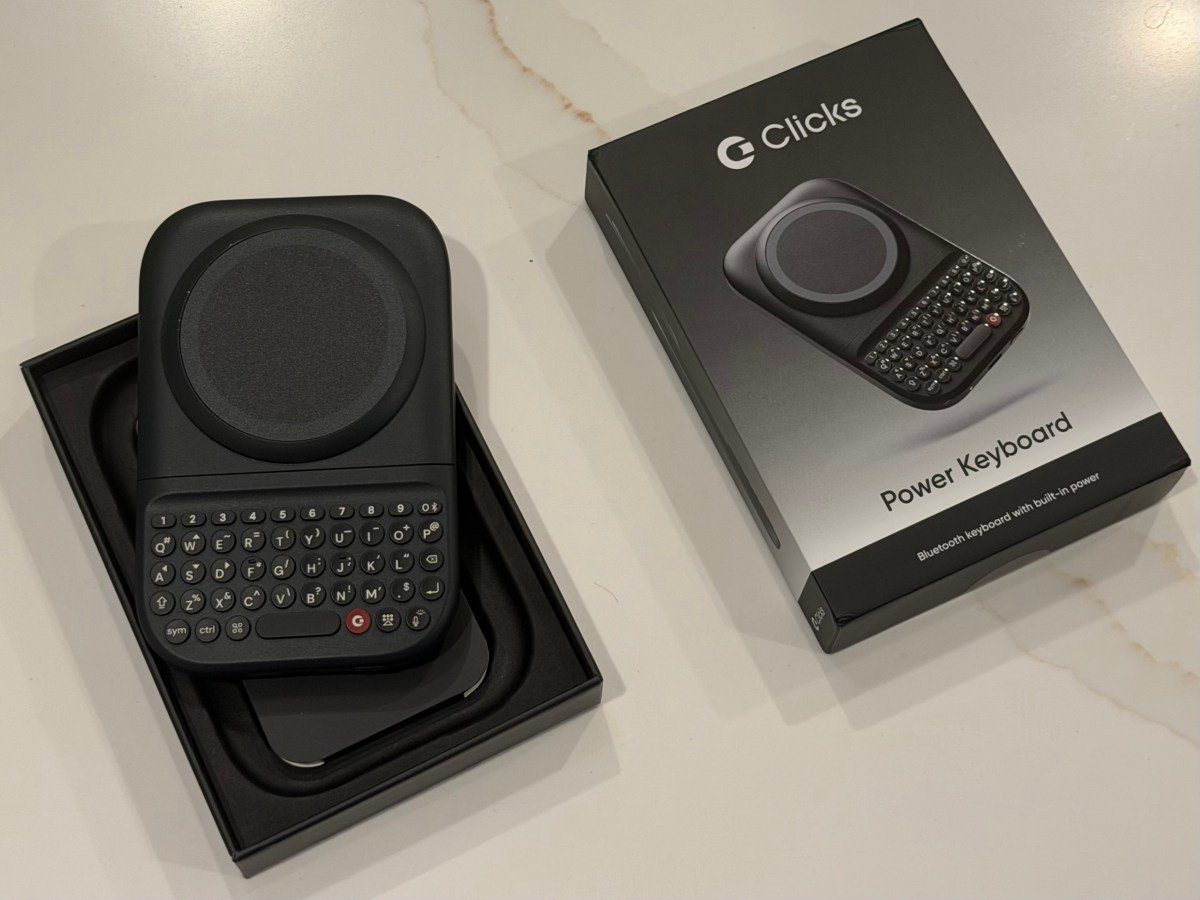
Clicks Technology, the startup determined to bring back physical keyboards to smartphones, began shipping its now-$99 MagSafe-compatible Power Keyboard this summer, after some delays. As of last week, 75% of the preorders from the first batch had shipped to customers.
Designed to work with a range of devices, this new slide-out keyboard with tactile buttons can accommodate different phone sizes and can be used in either portrait or landscape mode, the company says, giving any phone a BlackBerry-like feel.
The device is something of a teaser for what’s to come when Clicks ships its first smartphone, the BlackBerry-like Clicks Communicator, also featuring a physical keyboard, later this year.
Like the upcoming smartphone, the idea behind the Power Keyboard is to provide an alternative to onscreen keyboards for those who miss the speed and reliability that came with typing on a small, physical keyboard.
However, in its current implementation, the Power Keyboard suffers from the same fate as the company’s earlier Clicks keyboard — a smartphone case that included a physical keyboard. It can make the phone feel top-heavy and difficult to hold in portrait mode, especially if you’re using a larger smartphone as I did in tests with the iPhone 17 Pro Max and Pixel 10 XL.
Still, the device itself is crafted with care and could appeal to those who still desperately long for their BlackBerry.

Unboxing the device, we noticed the Power Keyboard was nicely packaged as a premium device would be, with peel-away cling films to prevent scratches during shipping and a full-color Quick Start guide to using the product.
You may first need to charge the device’s battery via USB-C, though we found ours shipped with a charge already. To pair the device with your phone over Bluetooth, press and hold the power button and slide out the keyboard.
We quickly paired the device with our Android phone. We ran into trouble once we switched over to the iPhone. Even after “forgetting” the device on Android, it still refused to pair with our iPhone. Returning to the instructions, it appears this was our mistake. The trick is to press a number key alongside the power button on the keyboard to add a second Bluetooth device. (The only way to actually “forget” a device is by removing it from its slot using the Clicks mobile app.)
The keyboard attaches to your phone via MagSafe or Qi2. If your phone doesn’t support either technology, you could opt to use an adhesive ring or a phone case that adds the magnetic power profile instead.

Once your device is connected, you can then pull the keyboard out when you need to type. Helpfully, the keyboard adjusts to different phone sizes, so it will work with standard models as well as larger Ultra or Pro Max devices. We appreciated the satisfying clicks as the keyboard locked into place on the various sliders. The keyboard offers an adjustable LED backlight, so you can type in the dark.
The keys themselves have a nice, clicky feel and are well-placed, making them easy to reach. While it takes quite a bit of adjustment after years of on-screen keyboards to return to pressing buttons, the learning curve is less steep than it was on the earlier Clicks keyboard case. It’s clear that the company has been iterating on what it learned with its older device, and those lessons have been channeled into this product.
In addition, while Clicks’ older keyboard case pulled power from the phone by way of its USB-C connection, the Power Keyboard instead includes a built-in 2,150 mAh battery.

The product itself has a slimmer profile than some snap-on battery packs, at 119.7 × 76.6 × 15.2 mm, and it doesn’t add an unreasonable amount of weight at 180 grams. Nevertheless, this is not something that would fit well in a woman’s pants pocket. The keyboard could get caught on a back pocket as well, as it could slide open if you press against the device while trying to cram the phone and keyboard into your pocket too quickly.
Despite the added heft, there is an advantage to the battery pack that powers the keyboard — it can provide wireless charging to products with MagSafe and Qi2. (You can opt to entirely disable wireless charging in the Clicks companion app, if you prefer to keep all the power reserved for the keyboard itself. Or you can designate a portion of the battery just for the keyboard.)
Another key advantage of the Power Keyboard is that it is highly customizable. Users can enable the Clicks key on the keyboard to function as a Tab button, or turn on “Cursor Mode” (Sym + CMD) to make certain letters on your keypad work as directional keys that move a cursor on the screen.

You can also adjust various settings like the idle timeout, battery reserves for wireless charging, LED backlight, and whether the Return key works as a hard or soft return. You can create your own Number Row shortcuts that allow you to press a number and the Sym button to enable Esc, volume controls, play/pause options, page up/down, and more.
And you can pair Apple Shortcuts with certain keys to do other things like start a call, get a weather forecast, turn on the flashlight, receive an AirDrop, send texts, and much more. (Several popular shortcuts are included in the Clicks app, but you can add your own.)
These, of course, are power user features that you’ll only appreciate if you get comfortable with typing on the keyboard first. That could take some time to learn, and arguably, you’ll be more comfortable using smaller, standard phones or lightweight options, like the iPhone Air. As for larger devices, we found it much easier to get started in landscape mode.

We also struggled to type comfortably with our iPhone case on, although it’s a heftier, protective case, not a slim case. To test the device, we removed the case and used our iPhone bare. While that was much better, it was still somewhat difficult to use because of the larger phone.
The company says it has tested the device with a number of phone models, including the iPhone Air, 17 Pro, 17 Pro Max, 16 Pro, Pixel 9, Galaxy Fold, and other Android devices.
Whether the keyboard is worth the purchase has much to do with how much you really miss your BlackBerry; for the time being, it’s an affordable enough holdover until the company’s smartphone ships, at least. (Prototypes of the phone were much easier to use when we tried them at CES in January. It’s obviously easier to make a comfortable device when Clicks is in control of all the technical specifications, instead of having to create something that works with phones of various weights and sizes.)
While the Power Keyboard works as advertised, for the sake of comfort and portability, I’d prefer to make the switch to physical keys with Clicks’ Communicator smartphone.

If you also decide this keyboard is not for you, all is not lost: There’s still another way to use the product.
Because the Power Keyboard should be able to pair with any device that supports external Bluetooth keyboards, you could use it with tablets, smart TVs like the Apple TV, or AR/VR headsets, like the Apple Vision Pro. This could come in handy when you’re trying to set up new apps and have to type your email address and passwords awkwardly via a remote control or other input method.
TechCrunch tries new devices via review units, which are later returned to the company or donated, depending on the company’s specific return procedures.
When you purchase through links in our articles, we may earn a small commission. This doesn’t affect our editorial independence.