


Close Menu

    Subscribe to Updates

    Get the latest news information from worldwide businesses.

    What's Hot

    K2 Climbing Simulation codes (May 2026)

    May 23, 2026

    Scientists Discover Unexpected Connection Between Vitamin D Levels and Pain Severity

    May 23, 2026

    Is FIFA World Cup 2026 finally coming to Indian screens? Big update expected next week

    May 23, 2026
    Facebook Instagram YouTube LinkedIn X (Twitter)
    Trending
    • K2 Climbing Simulation codes (May 2026)
    • Scientists Discover Unexpected Connection Between Vitamin D Levels and Pain Severity
    • Is FIFA World Cup 2026 finally coming to Indian screens? Big update expected next week
    • El Nino, Strait of Hormuz risks may fuel fresh global food inflation surge: Citi Research Report
    • Pope meets families who lost children to toxic waste in Italy’s ‘Land of Fires’ | Italy
    • West Bengal shifts Bakrid holiday to May 28, cancels earlier dates | India News
    • Filmmakers question amnesia claims of man found behind Burger King in 2004
    • Exam Date, Timing, Dress Code, Important Guidelines and Instructions for Prohibited Items, Things to Carry
    Newspublicly
    • About Us
    • Advertise & Partner with us
    • Pitch Your Story
    • Contact Us
    Facebook Instagram LinkedIn X (Twitter)
    Subscribe
    • Home
    • World News
      • Asia
      • India
      • USA
      • UK & Europe
      • Middle East
    • Economy & Business
      • Global Economy
      • Corporate & Industry
      • Finance & Markets
      • Policy & Trade
    • Technology
      • Gadgets & Devices
      • Software & Apps
      • AI & Machine Learning
      • Robotics & Automation
    • Health & Medicine
      • Fitness & Nutrition
      • Research & Innovation
      • Disease & Treatment
      • Doctors, Clinics & Patient Care
    • Travel & Tourism
    • Automobile
      • Electric & Hybrid Vehicles
      • Auto Industry Insights
    • Sports
    • More
      • Education
      • Real Estate
      • Environment & Climate
      • Space & Astronomy
      • War & Conflicts
    Newspublicly
    Home»Sports»Forza Horizon 6 convoy guide
    Sports

    Forza Horizon 6 convoy guide

    AdminBy AdminMay 23, 2026No Comments3 Mins Read0 Views
    Share
    Facebook Twitter LinkedIn Copy Link WhatsApp


    close

    Forza Horizon 6 convoys consist of a crew of racers who get together to participate in events or explore the map in free-roam. If you were looking to join your friends for a multiplayer session, then you must create a convoy and invite your friends, or join an already existing convoy through an invitation. However, this aspect of Forza Horizon can be a bit confusing for first-time players.

    On that note, this article sheds light on Forza Horizon 6 convoys and how players can utilize this system.


    Forza Horizon 6 convoys: How to join friends for a coop session

    How to create convoys

    The first step to joining friends and racing in a coop lobby is to create a convoy. This can be accomplished through the following steps:

    • Open the Escape menu and head to the Online tab.
    • Open the Convoy tab located towards the left of the screen.
    • A prompt will appear asking whether you want to Join An Existing Convoy or Create A New Convoy. Choose the second option.
    • Now you may select what type of events you are interested in. Alternatively, choose Anything Goes to figure out racing event details later.
    • Now you may invite your friends by selecting their names from the pop-up list.
    • If you are unable to locate a friend, search their username or check whether they are added to your friends list.
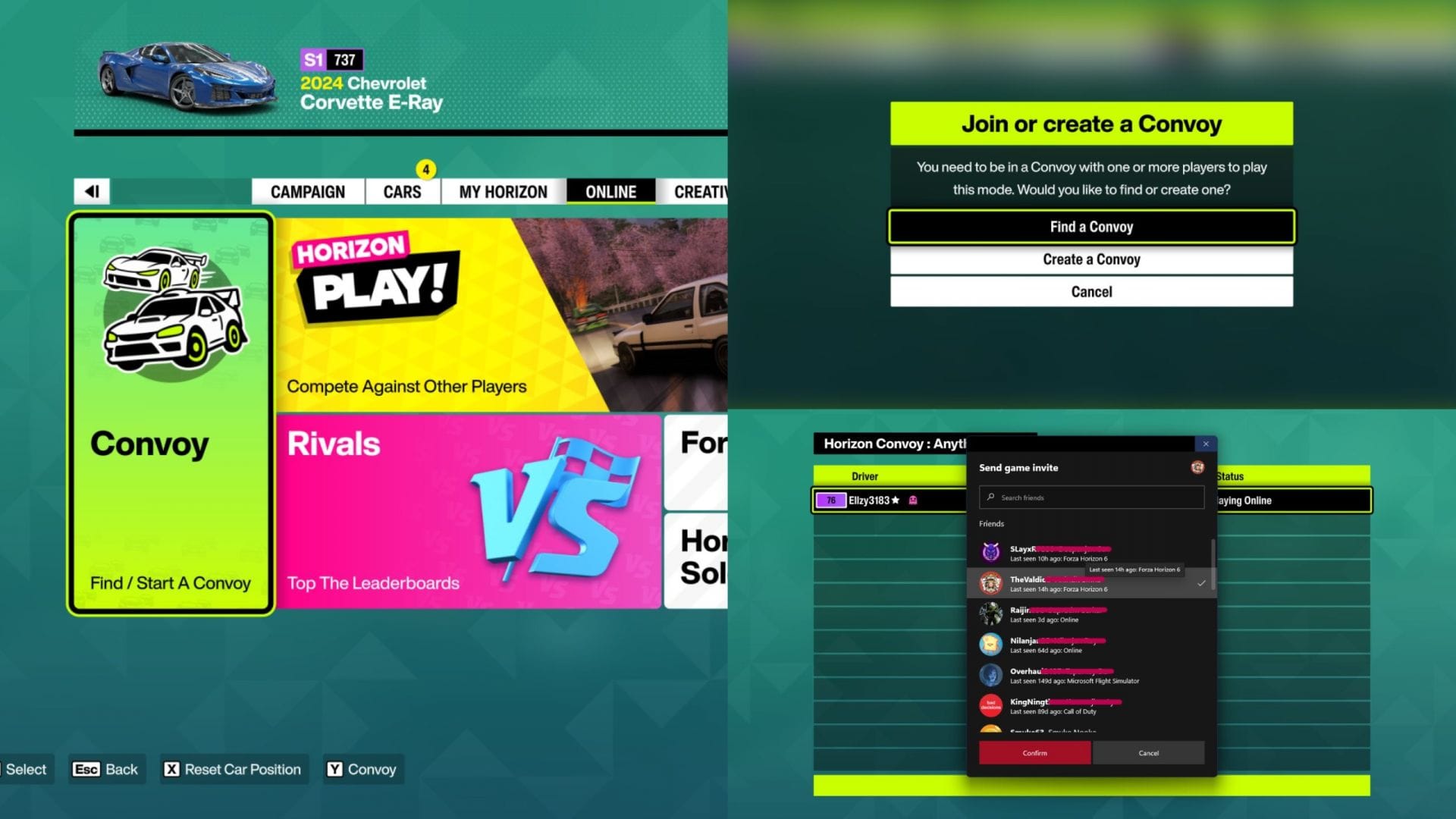
    Create a Forza Horizon 6 convoy to invite friends (Image via SK Gaming || Xbox Game Studios)
    Create a Forza Horizon 6 convoy to invite friends (Image via SK Gaming || Xbox Game Studios)

    Once your friends join, your crew can explore Japan, go through the Welcome to Japan Festival playlist, participate in various activities, and create a custom racing event by inviting 11 other players to the convoy session.


    Also read – Forza Horizon 6 Seasons guide


    Changing your convoy privacy

    Within the Convoy menu, press the appropriate keybind to open the Manage Convoy tab. Select Convoy Privacy to switch between these two options:

    • My Friends can join me – allows your friends to join you without needing to invite them
    • Invite Only – friends can only join if you invite them
    Changing Forza Horizon 6 convoy privacy (Image via SK Gaming || Xbox Game Studios)
    Changing Forza Horizon 6 convoy privacy (Image via SK Gaming || Xbox Game Studios)

    Additionally, you can head to the Settings menu and open the HUD & Gameplay tab to edit your Convoy Privacy and Crossplay options. This ensures that your default settings remain as the preferred options you chose within this menu.


    For more news and guides, follow Sportskeeda