

Close Menu

    Subscribe to Updates

    Get the latest news information from worldwide businesses.

    What's Hot

    Gina Carano: “The FBI is all over this sport”

    July 13, 2026

    Waze Is Supercharging Destination Search With Gemini AI

    July 13, 2026

    Germany wants rental e-scooter companies to pay for accidents

    July 13, 2026
    Facebook Instagram YouTube LinkedIn X (Twitter)
    Trending
    • Gina Carano: “The FBI is all over this sport”
    • Waze Is Supercharging Destination Search With Gemini AI
    • Germany wants rental e-scooter companies to pay for accidents
    • Can Sitting With One Ankle Tucked Under the Opposite Thigh Damage Your Spine? Orthopaedic Experts Explain
    • EU says age-check app ‘ready’ in push to protect children online
    • NMC Approves 150 Additional MBBS Seats for Govt Medical Colleges in J&K, Andhra Pradesh
    • India, US have framework trade deal ready; signing awaits right time: Official
    • Flipkart deepens West Bengal investments, backs jobs and MSMEs
    Newspublicly
    • About Us
    • Advertise & Partner with us
    • Pitch Your Story
    • Contact Us
    Facebook Instagram LinkedIn X (Twitter)
    Subscribe
    • Home
    • World News
      • Asia
      • India
      • USA
      • UK & Europe
      • Middle East
    • Economy & Business
      • Global Economy
      • Corporate & Industry
      • Finance & Markets
      • Policy & Trade
    • Technology
      • Gadgets & Devices
      • Software & Apps
      • AI & Machine Learning
      • Robotics & Automation
    • Health & Medicine
      • Fitness & Nutrition
      • Research & Innovation
      • Disease & Treatment
      • Doctors, Clinics & Patient Care
    • Travel & Tourism
    • Automobile
      • Electric & Hybrid Vehicles
      • Auto Industry Insights
    • Sports
    • More
      • Education
      • Real Estate
      • Environment & Climate
      • Space & Astronomy
      • War & Conflicts
    Newspublicly
    Home»Technology»Gadgets & Devices»This free Mac app reveals the truth about your mystery USB-C cables
    Gadgets & Devices

    This free Mac app reveals the truth about your mystery USB-C cables

    AdminBy AdminJuly 13, 2026No Comments6 Mins Read0 Views
    Share
    Facebook Twitter LinkedIn Copy Link WhatsApp


    Nearly three years ago, I showed you an awesome $8 cable tester that quickly tells you if your USB-C cable is likely fast, slow, powerful, or weak. Sadly, that gadget got discontinued, and I’ve never found anything as intuitive or inexpensive since. But if you’ve got a Mac with Apple Silicon chips, you can simply download an even more impressive tester for free.

    It’s called WhatCable, and it works by reading the data your Mac already collects about attached USB devices, data that Apple doesn’t normally pass along to you. Just click a little widget that lives in the menu bar atop your Mac, and you can see every USB-C cable and device attached to your computer.

    Here’s how creator Darryl Morley explained it to me:

    Every Apple Silicon Mac has a port controller chip that handles USB Power Delivery negotiation. When you plug in a cable with an e-marker, the port controller sends a “Discover Identity” message to the chip in the cable and gets back a structured message: vendor ID, speed rating, current rating, voltage limits, whether it’s active or passive, and so on.

    macOS writes that response into the IOKit registry. WhatCable reads it using Apple’s public APIs. No root access, no private entitlements. The data isn’t hidden, Apple’s firmware does the negotiation and publishes the result. It’s just not surfaced anywhere in standard macOS tooling. WhatCable reads what’s already there.

    The e-marker is one source. WhatCable also reads from the Mac’s own hardware, the actual negotiated connection speed, Thunderbolt link speed, and live voltage and current at each port. The connected device tells us what it is, who made it, and what it supports. Put all three together, cable, device, and Mac, and WhatCable can tell you not just what everything claims to support, but what’s actually happening on the connection right now, and which part is the bottleneck if something isn’t performing as expected.

    Want to see it in action? I took photos while testing some of my favorite cables this week. It’s not a perfect solution, as cables can lie about their capabilities, but WhatCable genuinely helped me find a bad cable along the way.

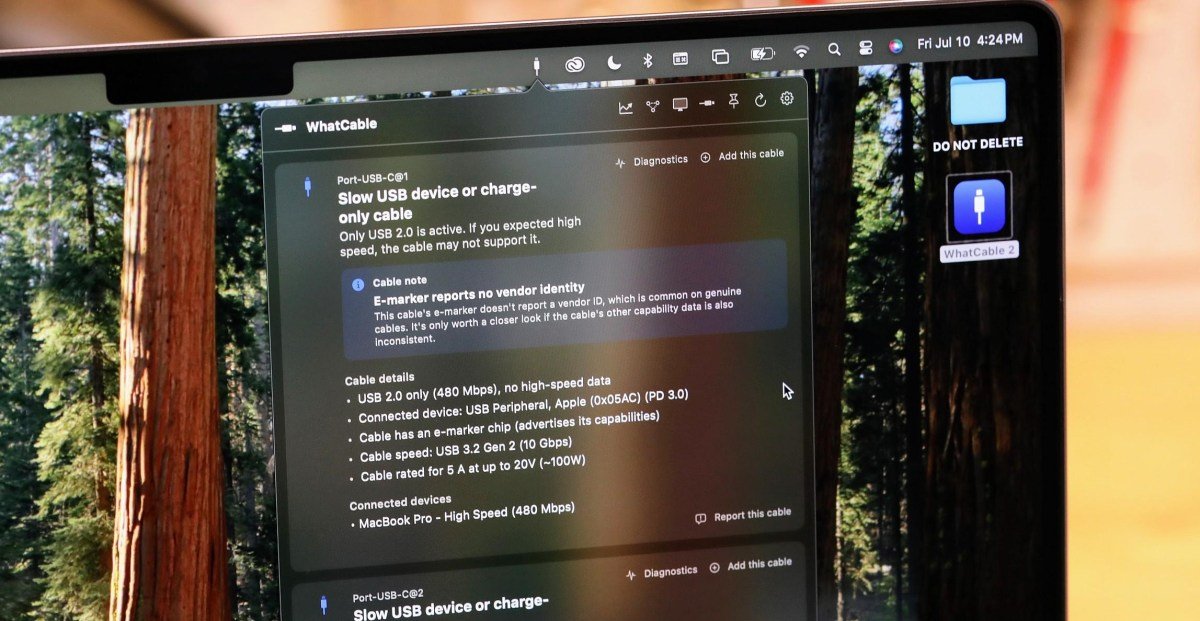
    When I plugged in the short, lightweight Satechi cable you see above into two ports on my MacBook Pro, I got this:

    The important part here is “Cable rated for 5 A at up to 20V (~100W)”. It’s a good charge cable.

    The important part here is “Cable rated for 5 A at up to 20V (~100W)”. It’s a good charge cable.

    I know from experience that this info is correct, and that means it’s still a valuable cable. 480Mbps USB 2.0 is very slow, but the cable is self-reporting it can charge at 100 watts, nearly as fast as my Mac can charge.

    That’s slightly more useful info than my $8 tester can provide. It, too, shows that the cable only offers USB 2.0 speeds and probably offers 60W or better charging because an e-marker exists. But it can’t read e-marker data to tell that this cable supports 100W charging speeds.

    Sure enough, I’m getting more than 60W when I plug a 140W battery into my Mac:

    WhatCable can detect that I’m connected to a 100W charger, too:

    “Plugged in - 100W charger.”

    “Plugged in – 100W charger.”

    Now, let’s try one of my five favorite USB-C cables yet — my 10Gbps, 100W Supercalla cable with magnetic winding beads:

    My Supercalla cable.

    My Supercalla cable.

    That’s strange: the cable’s e-marker does claim it’s 10Gbps and 100W, but the Mac isn’t treating it that way!

    “Slow USB device or charge-only cable.”

    “Slow USB device or charge-only cable.”

    When I plug in a fast 10Gbps SSD, I’m not getting that speed with this cord:

    And it appears that’s because my daily driver cable is finally wearing out. Guess it’s time to retire this one!

    “Connection dropped 3 times.”

    “Connection dropped 3 times.”

    Now let’s try the theoretically latest and greatest cable in my drawer: a 240W USB4 40Gbps cable.

    Again, the e-marker seems to validate those speeds, even if the Mac isn’t connecting to itself at that rate.

    “40 Gbps, Thunderbolt 4 class.”

    “40 Gbps, Thunderbolt 4 class.”

    Once I plug in the drive, WhatCable detects that the Mac has a 10Gbps link:

    “Device runs at 10 Gbps.”

    “Device runs at 10 Gbps.”

    That’s more like it: this 25GB transfer is measured in seconds instead of minutes:

    Here’s a cable that arrived at my home just the other day exclusively for 100W charging. I’m not expecting more than USB 2.0 480Mbps data; on Amazon, the company only advertised USB 2.0 speeds:

    But WhatCable says its own e-marker advertises 10Gbps USB 3 data… could it be?

    “Cable speed: USB 3.2 Gen 2 (10 Gbps).”

    “Cable speed: USB 3.2 Gen 2 (10 Gbps).”

    I’m afraid not: this cable’s e-marker wrote checks its body couldn’t cash. Minutes, not seconds, for the same 25GB transfer:

    Here, my $8 tester did a better job, immediately detecting that the cable doesn’t support SS (SuperSpeed, aka USB 3).

    Note that the SS (SuperSpeed) light isn’t lit.

    Note that the SS (SuperSpeed) light isn’t lit.

    It delivers on the 5 amp charging speeds, though:

    “20Gbps capable.” But is it really?

    “20Gbps capable.” But is it really?

    Next, I thought I’d plug in my magnetic accordion USB-A to USB-C cable, which is definitely only capable of 480Mbps USB 2.0 speeds:

    Strangely, the Mac insists it’s running at 10Gbps… while connected to my external battery. That seems wrong!

    Last but not least, here’s the old faithful cable that came with a LaCie drive I bought way back in 2019, one I’ve always turned to for stability and speed:

    It’s reporting as a 20Gbps Thunderbolt cable, even though it says 10Gbps on the end. I don’t have one handy, but I’ll have to try it with a Thunderbolt drive to check!

    Morley isn’t the first to realize a MacBook could be a USB-C cable tester. USB Connection Information is a similar paid app that arrived a year ago. But Morley’s version is free, and he tells me it “will always stay free at its core,” though you can pay £9.99 to get the Pro version that offers a real-time power monitor, diagnostics, and a terminal view.

    He’s also now built an even simpler version of the idea called WhatPort that simply monitors what each of your Mac’s USB-C ports is doing right now, including power, data, and video.

    Morley tells me he won’t be able to build a version of WhatCable for Windows because “there’s too much hardware variance and the Windows APIs don’t expose what WhatCable needs,” and says Android and iOS similarly don’t provide enough low-level access.

    “If anyone has a workaround I’d love to hear it,” he says.

    But he’s already working on a Linux port, and is continuing to update the Mac version. You can follow along with the updates at his GitHub page.

    Photos by Sean Hollister / The Verge

    Follow topics and authors from this story to see more like this in your personalized homepage feed and to receive email updates.

    • Sean Hollister

      Sean Hollister

      Sean Hollister

      Posts from this author will be added to your daily email digest and your homepage feed.

      See All by Sean Hollister

    • Gadgets

      Posts from this topic will be added to your daily email digest and your homepage feed.

      See All Gadgets

    • Tech

      Posts from this topic will be added to your daily email digest and your homepage feed.

      See All Tech


    Source link

    Author

    • Admin

      NewsPublicly.com is News & Articles Platform that creating SEO-focused articles on travel, lifestyle, and digital trends.

    Admin
    • Website

    NewsPublicly.com is News & Articles Platform that creating SEO-focused articles on travel, lifestyle, and digital trends.

    Related Posts

    Social media limits are coming for teens across Europe

    July 13, 2026

    Waze is getting a bunch of new AI-powered features

    July 13, 2026

    Shall We Go On Sinning So That Grace May Increase? is hypnotic, healing, and hopeful

    July 12, 2026
    Leave A Reply Cancel Reply

    Demo
    Top Posts

    The Blue Moon rises on May 30— Where and when to see the second full moon of the month

    May 30, 202640 Views

    New SOCOM rifle allows barrel swapping and cartridge changes

    June 1, 202633 Views

    “Inside Gemini Robotics 1.5: How Robots Learn to Reason & Act

    November 22, 202525 Views

    525 pounds of cocaine seized after Nebraska K9 alerts troopers on I-80

    May 28, 202624 Views
    Don't Miss

    Gina Carano: “The FBI is all over this sport”

    July 13, 20263 Mins Read0 Views

    Gina Carano has hit out at conspiracy theories that Conor McGregor’s fight at UFC 329…

    Waze Is Supercharging Destination Search With Gemini AI

    July 13, 2026

    Germany wants rental e-scooter companies to pay for accidents

    July 13, 2026

    Can Sitting With One Ankle Tucked Under the Opposite Thigh Damage Your Spine? Orthopaedic Experts Explain

    July 13, 2026
    Stay In Touch
    • Facebook
    • Twitter
    • Instagram
    • YouTube
    • LinkedIn
    • WhatsApp

    Subscribe to Updates

    Get the latest creative news from SmartMag about art & design.

    Demo
    NEWSPUBLICLY
    Facebook X (Twitter) Instagram LinkedIn

    Home

    • About Us
    • Leadership
    • Advertise & Partner With Us
    • Pitch Your Story
    • Media Kit & Pricing
    • Career
    • FAQs

    Guidelines

    • Editorial & Submission
    • Partnership
    • Advertising & Sponsor
    • Intellectual Property Policy
    • Community & Comment
    • Security & Data Protection
    • Send Your Opinion

    Quick Links

    • Cookie Policy
    • Payment & Billing Terms
    • Refund & Cancellation
    • Copyright Policy
    • Complaint & Support
    • Sitemap
    • Contact Us

    Subscribe Us

    Get the latest news and updates!

    Copyright © 2026 Newspublicly (DIGITALIX COMMUNICATION). All Rights Reserved.
    • Privacy Policy
    • Terms of Use
    • Disclaimer