


Close Menu

    Subscribe to Updates

    Get the latest news information from worldwide businesses.

    What's Hot

    DJ Moore sends clear message after being expected to be “the guy that’s going to help Josh Allen not do everything on his own”

    August 2, 2026

    Mysterious Milky Way object accelerates protons beyond one quadrillion electron volts

    August 2, 2026

    Strong health systems for all with better public spending

    August 2, 2026
    Facebook Instagram YouTube LinkedIn X (Twitter)
    Trending
    • DJ Moore sends clear message after being expected to be “the guy that’s going to help Josh Allen not do everything on his own”
    • Mysterious Milky Way object accelerates protons beyond one quadrillion electron volts
    • Strong health systems for all with better public spending
    • Hyderabad Metro Turns Lifeline for Time-Critical Heart and Lung Transplant
    • Fender’s CEO seems to think your bandmates are just analog AI
    • RBI special windows seen big enough to bring in $100B
    • ET explainer: Centre’s 4-month extension to ease compliance burden for realty companies, ensure project completion
    • Data centres draw 40% of institutional capital in the June quarter
    Newspublicly
    • About Us
    • Advertise & Partner with us
    • Pitch Your Story
    • Contact Us
    Facebook Instagram LinkedIn X (Twitter)
    Subscribe
    • Home
    • World News
      • Asia
      • India
      • USA
      • UK & Europe
      • Middle East
    • Economy & Business
      • Global Economy
      • Corporate & Industry
      • Finance & Markets
      • Policy & Trade
    • Technology
      • Gadgets & Devices
      • Software & Apps
      • AI & Machine Learning
      • Robotics & Automation
    • Health & Medicine
      • Fitness & Nutrition
      • Research & Innovation
      • Disease & Treatment
      • Doctors, Clinics & Patient Care
    • Travel & Tourism
    • Automobile
      • Electric & Hybrid Vehicles
      • Auto Industry Insights
    • Sports
    • More
      • Education
      • Real Estate
      • Environment & Climate
      • Space & Astronomy
      • War & Conflicts
    Newspublicly
    Home»Sports»Forza Horizon 6 convoy guide
    Sports

    Forza Horizon 6 convoy guide

    AdminBy AdminMay 23, 2026No Comments3 Mins Read0 Views
    Share
    Facebook Twitter LinkedIn Copy Link WhatsApp


    close

    Forza Horizon 6 convoys consist of a crew of racers who get together to participate in events or explore the map in free-roam. If you were looking to join your friends for a multiplayer session, then you must create a convoy and invite your friends, or join an already existing convoy through an invitation. However, this aspect of Forza Horizon can be a bit confusing for first-time players.

    On that note, this article sheds light on Forza Horizon 6 convoys and how players can utilize this system.


    Forza Horizon 6 convoys: How to join friends for a coop session

    How to create convoys

    The first step to joining friends and racing in a coop lobby is to create a convoy. This can be accomplished through the following steps:

    • Open the Escape menu and head to the Online tab.
    • Open the Convoy tab located towards the left of the screen.
    • A prompt will appear asking whether you want to Join An Existing Convoy or Create A New Convoy. Choose the second option.
    • Now you may select what type of events you are interested in. Alternatively, choose Anything Goes to figure out racing event details later.
    • Now you may invite your friends by selecting their names from the pop-up list.
    • If you are unable to locate a friend, search their username or check whether they are added to your friends list.
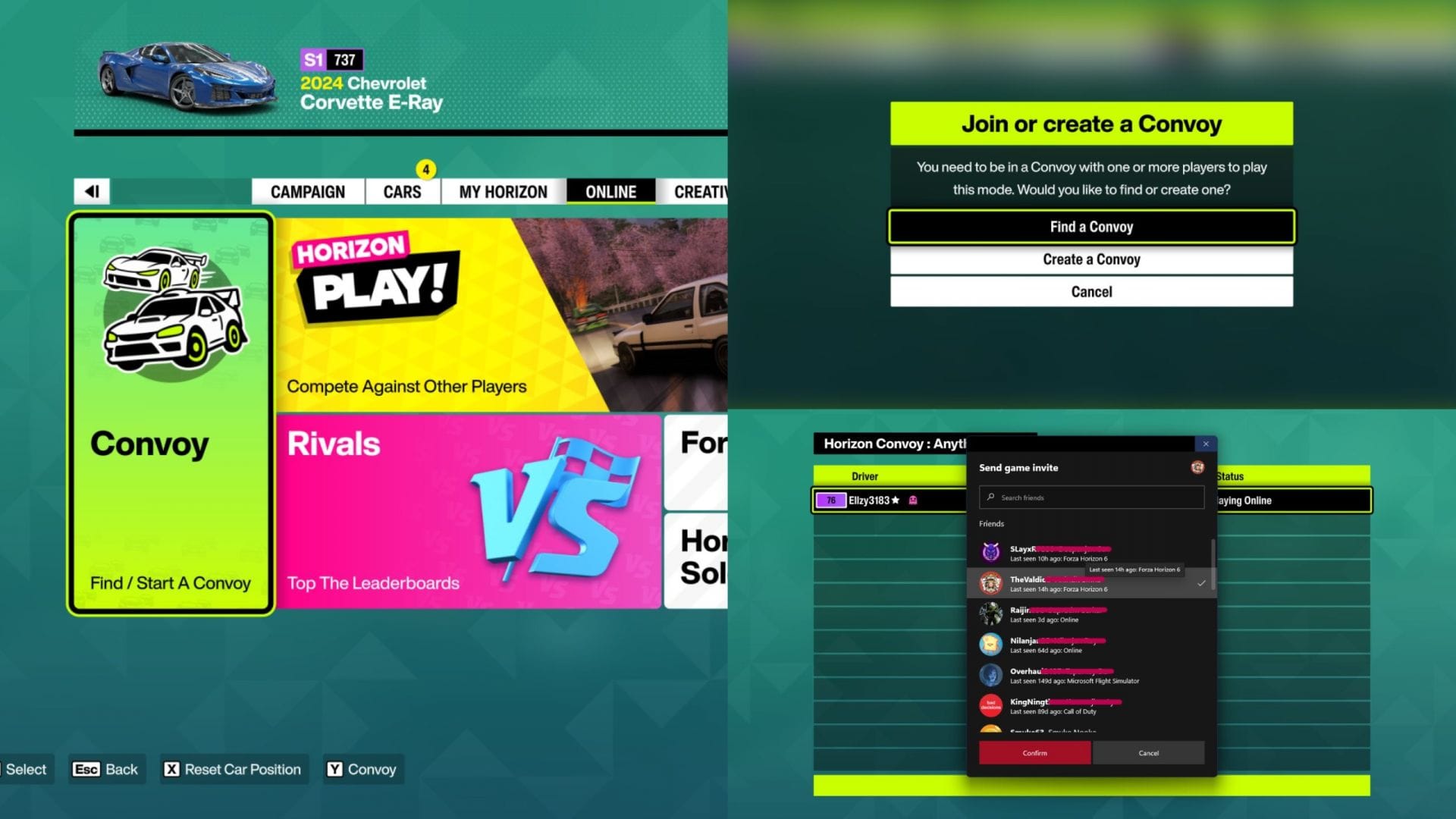
    Create a Forza Horizon 6 convoy to invite friends (Image via SK Gaming || Xbox Game Studios)
    Create a Forza Horizon 6 convoy to invite friends (Image via SK Gaming || Xbox Game Studios)

    Once your friends join, your crew can explore Japan, go through the Welcome to Japan Festival playlist, participate in various activities, and create a custom racing event by inviting 11 other players to the convoy session.


    Also read – Forza Horizon 6 Seasons guide


    Changing your convoy privacy

    Within the Convoy menu, press the appropriate keybind to open the Manage Convoy tab. Select Convoy Privacy to switch between these two options:

    • My Friends can join me – allows your friends to join you without needing to invite them
    • Invite Only – friends can only join if you invite them
    Changing Forza Horizon 6 convoy privacy (Image via SK Gaming || Xbox Game Studios)
    Changing Forza Horizon 6 convoy privacy (Image via SK Gaming || Xbox Game Studios)

    Additionally, you can head to the Settings menu and open the HUD & Gameplay tab to edit your Convoy Privacy and Crossplay options. This ensures that your default settings remain as the preferred options you chose within this menu.


    For more news and guides, follow Sportskeeda