

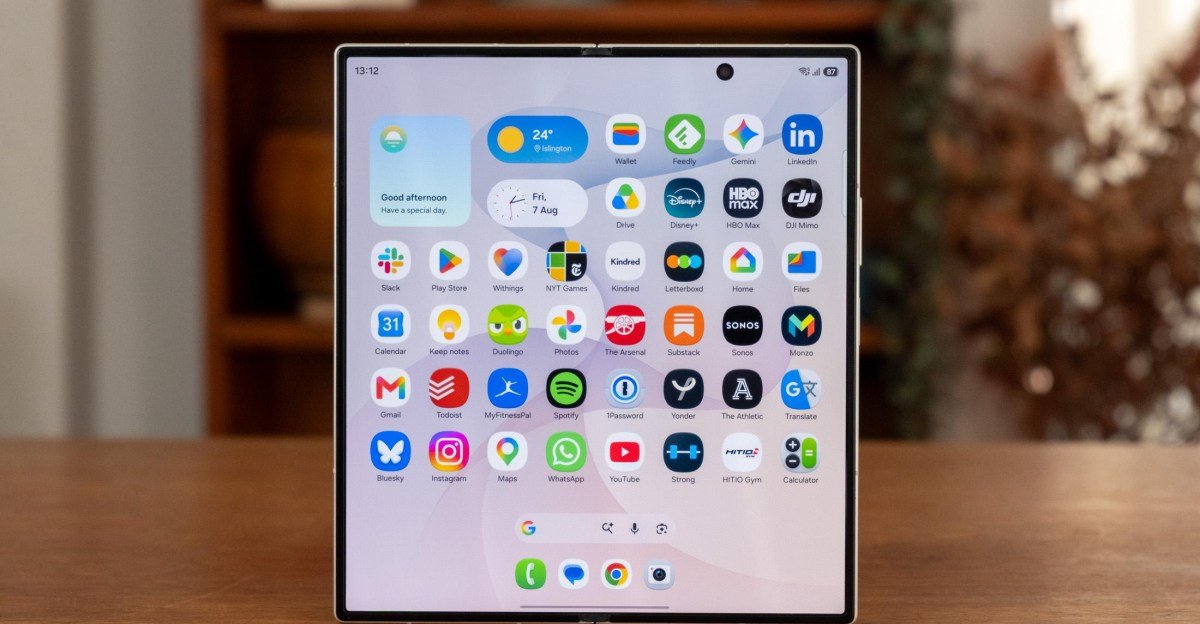
What makes the Samsung Galaxy Z Fold 8 Ultra so Ultra? Samsung’s first foldable with the Ultra name isn’t a souped-up version of the regular Fold 8, as you might expect. Where the Z Fold 8 is squat and wide, the Fold 8 Ultra retains the thin outer screen and square inner panel of the previous Folds. It does have a substantially better triple rear camera system and a slightly larger battery. But with no support for the S Pen stylus and no Privacy Display, it’s not Ultra in the same way as the Galaxy S26 Ultra.
But compare it to last year’s Z Fold 7 and the upgrades look more substantial. Samsung has improved the displays, battery, charging, cameras, chipset, and crease. Most of these are only iterative, but taken together the package is impressive.
Does that make it Ultra? I don’t know, and it doesn’t really matter. This is a meaningfully more capable phone than last year’s, albeit for $100 more, and it offers something different than its wider new sibling. Samsung will have to hope that’s enough to hold up against whatever Apple has coming with its expected foldable iPhone next month.


$2100
The Good
- Good triple rear camera
- Excellent battery life
- Thin, lightweight design
The Bad
- Only IP48 dust- and water-resistance
- I prefer Samsung’s other foldable form factors
- $2,100 is a whole lot of money
Closed, the Z Fold 8 Ultra has a 6.5-inch cover screen that’s taller than most phones but skinnier too; open, there’s an 8-inch flexible display that’s almost square in its aspect ratio.
At a glance, you’d struggle to tell it apart from last year’s Z Fold 7. It’s the same size, shape, and weight, apart from being fractionally thinner at 4.1mm thick when open. The cameras are in the same spot and look just about identical. In fact, the new set of colors — dark grey, cream, purple, and green — is really the only way to differentiate the two generations by sight.


Samsung argues that while the new Z Fold 8 is designed for content consumption, the taller Ultra is more useful for productivity. The extra vertical space helps if you’re trying to cross-reference documents or navigate multiple inboxes. Personally, I’m more likely to use the larger inner screen for watching video, so I would take the Z Fold 8 over this, but I do see the benefits of the larger space. I wrote two whole articles for my food newsletter across a couple of flights using the Z Fold 8 Ultra’s on-screen keyboard, something I would never consider with a regular phone or even the smaller Z Fold 8.
Both displays are brighter than before, now with a peak brightness of 3,000 nits, making them easier to use outside. The inner screen benefits further from a new anti-reflective coating and a small resolution bump to 2256 x 2504.
Just as importantly, Samsung has reworked the main screen’s innards, incorporating a new titanium alloy film and a flexible titanium plate. These make the foldable screen thinner and more durable — and combined with the anti-reflective coating, they also make the crease harder to see and feel. Head-on, it’s now almost invisible, though still relatively clear when the light catches it at an off angle. Oppo’s solution in the Find N6, which involves using 3D printing to fill surface-level gaps in the hinge, seems more effective at eliminating the crease, but it’s hard to imagine anyone finding this version especially bothersome.


The biggest year-over-year upgrade is the battery. For the first time, Samsung has adopted silicon-carbon battery chemistry, which makes it possible to fit higher-capacity batteries into the same-size space. As a result, the Z Fold 8 Ultra has jumped from a 4,400mAh battery last year to 5,000mAh, despite being fractionally thinner. The phone easily lasts a day, even with a few hours of inner screen use, and I usually have 30 to 40 percent left when I head to bed.
The bigger battery has been bolstered by faster charging — 45W wired and 20W wireless — though the phone is still only Qi2 Ready, meaning there are no charging magnets inside, and it requires a Qi2 case to hit top wireless charging speeds. That helps keep it thin, in fairness, so may be a worthy tradeoff.
An IP68 rating is another major omission; the IP48 rating here means good water protection but limited guarantees against dust and sand. Samsung removed S Pen support in last year’s Z Fold 7, and it’s still missing here. There’s also no sign of the impressive Privacy Display technology introduced in this year’s S26 Ultra.

Then there are the cameras. If you’re picking between the Z Fold 8 and Z Fold 8 Ultra, then form factor aside, this is the only difference that matters. The Ultra gets the same 50-megapixel, f/1.9 ultrawide as the Fold 8, but its 200-megapixel main camera is substantially superior in both detail and light capture. And the presence of a 10-megapixel, 3x telephoto adds a welcome versatility that the regular Fold 8 lacks. It’s far from the best telephoto in any phone — it’s an area where manufacturers like Vivo and Xiaomi have devoted considerable resources, including larger sensors and superior stabilization — but just having the option makes this a more flexible camera. I wouldn’t push the zoom much beyond its 3x optical range though, with significant noise creeping in above 6x or so.
There’s an impressive level of consistency between the three lenses in most conditions, though just occasionally the ultrawide comes out a little differently. It’s usually more muted, though at least once, it took the most vivid shot. Low-light performance across all three lenses is good, though they’re all guilty of over-lightening the nighttime sky and creating flare around brighter lights.
1/25
Samsung’s software updates this year are relatively slight. There’s My FanCam, a video editing feature that uses AI to crop videos in on a specific person. Google’s Gemini Intelligence task automation is supported, but so far isn’t available in the UK, meaning I haven’t tested it. Now Nudge, Samsung’s take on Pixel Magic Cue, has apparently been updated to suggest helpful contextual actions (like adding an event to your calendar) to carry out in split-screen. In a week of using the phone, I haven’t seen it pop up once, even after subjecting myself to Samsung Keyboard the whole time because some reports suggest that’s a requirement.

I’ve been more impressed than I expected by the Z Fold 8 Ultra. I thought it would struggle to compete with recent excellent foldables from Oppo and Honor, but in reality, it’s a fairly close contest — and unlike those phones, it’s actually on sale in the US.
Its cameras still aren’t at the level of Oppo and Honor’s, and without an S Pen or a Privacy Display, I’d quibble over how Ultra it all really is. But for those who prefer the tall, square foldable form factor, this is a worthy follow-up to the Z Fold 7. The substantially larger battery alone justifies the $100 price hike.
I don’t know which of Samsung’s two Z Fold 8 phones I’d buy this year — really, I want the Z Fold 8’s form factor with the Ultra’s cameras squeezed in — but that indecision is testament to the fact that you can’t go too far wrong with either.
Photography by Dominic Preston / The Verge
Agree to Continue: Samsung Galaxy Z Fold 8 Ultra
Every smart device now requires you to agree to a series of terms and conditions before you can use it — contracts that no one actually reads. It’s impossible for us to read and analyze every single one of these agreements. But we started counting exactly how many times you have to hit “agree” to use devices when we review them since these are agreements most people don’t read and definitely can’t negotiate.
To use the Galaxy Z Fold 8 Ultra, you must agree to:
- Google Terms of Service
- Google Play Terms of Service
- Google Privacy Policy (included in ToS)
- Install apps and updates: “You agree this device may also automatically download and install updates and apps from Google, your carrier, and your device’s manufacturer, possibly using cellular data.”
- Samsung End User Licence Agreement
- Samsung Privacy Notice
- Samsung Terms and Conditions
There’s also a variety of optional agreements, including:
- Provide anonymous location data for Google’s services
- “Allow apps and services to scan for Wi-Fi networks and nearby devices at any time, even when Wi-Fi or Bluetooth is off.”
- Send usage and diagnostic data to Google
- Google Gemini Apps Privacy Notice if you opt in to using Gemini Assistant
- Turn on Samsung offline finding
- Samsung news and special offers
- Samsung personalized advertising
- Bixby personal data intelligence
- Samsung customization service
Other features, like Google Wallet, may require additional agreements.
Final tally: seven mandatory agreements and more than nine optional agreements.